数据定义
1. CSV 定义
id,field_a,field_b,related_id:id
id1,valueA1,valueB1,module.relatedid
id2,valueA2,valueB2,module.relatedid
2. XML 定义
<odoo>
  <record id="id1" model="tutorial.example">
    <field name="field_a">valueA1</field>
    <field name="field_b">valueB1</field>
  </record>

  <record id="id2" model="tutorial.example">
    <field name="field_a">valueA2</field>
    <field name="field_b">valueB2</field>
  </record>
</odoo>
a. 用 ref 引用数据
<odoo>
  <record id="id1" model="tutorial.example">
    <field name="related_id" ref="module.relatedid"/>
  </record>
</odoo>
b. 执行 python code
<function model="tutorial.example" name="action_validate">
    <value eval="[ref('demo_invoice_1')]"/>
</function>
c. 使用 Command 处理 x2many 字段
<odoo>
  <record id="id1" model="tutorial.example">
    <field name="related_ids" eval="[
        Command.create({
            'name': 'My name',
        }),
        Command.create({
            'name': 'Your name',
        }),
        Command.link(ref('model.xml_id')),
    ]"/>
  </record>
</odoo>
d. noupdate 的作用
- 如果设为 True (1)
- 升级模块的时候不会更新记录初始数据
- 如果数据不存在则会创建它
- 作用:避免每次更新初始数据覆盖了新数据
- odoo-bin -i 可以设置总是加载初始数据,但不应该在生产环境使用
e. 权限组定义
<record id="group_hr_user" model="res.groups">
  <field name="name">Officer</field>
  <field name="category_id" ref="base.module_category_human_resources_employees"/>
  <field name="implied_ids" eval="[(6, 0, [ref('base.group_private_addresses'), ref('base.group_user')])]"/>
  <field name="comment">The user will be able to approve document created by employees.</field>
</record>
数据
数据库导入导出
Import an existing database
Note

You can directly go to the Theming chapter if you do not need to import an existing database.

Dump
Odoo SaaS
Go to <database_url>/saas_worker/dump.

Odoo.sh
Connect to Odoo.sh.

Select the branch you want to back up.

Choose the BACKUPS tab.

Click the Create Backup button.

When the process is over, a notification appears. Open it and click the Go to Backup button.

Click the Download icon. Select Testing under Purpose and With filestore under Filestore.


You will receive a notification when the dump is ready to be downloaded. Open it and click on Download to get your dump.


Move filestore
Copy all the folders included in the filestore folder and paste them to the following location on your computer:

macOS: /Users/<User>/Library/Application Support/Odoo/filestore/<database_name>

Linux: /home/<User>/.local/share/Odoo/filestore/<database_name>

Note

/Library is a hidden folder.

Database setup
Create an empty database.

createdb <database_name>
Import the SQL file in the database that you just created.

psql <database_name> < dump.sql
Reset the admin user password.

psql \c
<database_name>
update res_users set login='admin', password='admin' where id=2;
Getting started
Running Odoo
Once all dependencies are set up, Odoo can be launched by running odoo-bin, the command-line interface of the server. It is located at the root of the Odoo Community directory.

Running Odoo

Docker

To configure the server, you can specify command-line arguments or a configuration file. The first method is presented below.

The CLI offers several functionalities related to Odoo. You can use it to run the server, scaffold an Odoo theme, populate a database, or count the number of lines of code.

Shell script
A typical way to run the server would be to add all command line arguments to a .sh script.

Example

./odoo-bin --addons-path=../enterprise,addons --db-filter=<database> -d <database> --without-demo=all -i website --dev=xml
Folder

Description

--addons-path

Comma-separated list of directories in which modules are stored. These directories are scanned for modules.

-d

--database

database(s) used when installing or updating modules.

--db-filter

Hides databases that do not match the filter.

-i

--init

Comma-separated list of modules to install before running the server. (requires -d)

-u

--update

Comma-separated list of modules to update before running the server. (requires -d)

--without-demo

Disables demo data loading for modules installed comma-separated; use all for all modules. (requires -d and -i)

--dev

Comma-separated list of features. For development purposes only. More info

Sign in
After the server has started (the INFO log odoo.modules.loading: Modules loaded. is printed), open http://localhost:8069 in your web browser and log in with the base administrator account.

Type admin for the email and admin for the password.


Tip

Hit CTRL+C to stop the server. Do it twice if needed.
xml_id 存储
由于 odoo 不想让每个表都保存 xml_id 字段,因此单独用 ir.model.data 进行了存储
模型
字段
x2many, many2one
可以使用 Command 操作关系字段
from odoo import Command
def inherited_action(self):
    self.env["test_model"].create(
        {
            "name": "Test",
            "line_ids": [
                Command.create({
                    "field_1": "value_1",
                    "field_2": "value_2",
                })
            ],
        }
    )
    return super().inherited_action()
权限
建议
- 大部分模块最好都有 Admin(或 manager) 和 User 角色,Manager 用来管理配置和所有数据,User 用来完成基础功能和操作
- ACL 可以不设置 Group,但是不建议这么做,有可能赋予非用户的人员访问权限
- 在 ODOO 中可以使用 sudo()或者 SQL 来绕过权限检测
- 使用 SQL 会绕过 ORM的逻辑,需要留意
- 绕过权限检测时,需要确认是否有必要
Visibility 和 Security
security
security 是后端限制,用户无法访问记录字段和操作
- 字段的 groups
visibility
visibility 是前端限制,用户还可以通过其他方式访问记录,例如 RPC 或者 ORM 操作
- view xml 的 groups
- menus 和 actions 的 groups
Record Rules
record rules 可以提供或者限制某个模型记录的权限
<record id="rule_id" model="ir.rule">
    <field name="name">A description of the rule's role</field>
    <field name="model_id" ref="model_to_manage"/>
    <field name="perm_read" eval="False"/>
    <field name="groups" eval="[Command.link(ref('base.group_user'))]"/>
    <field name="domain_force">[
        '|', ('user_id', '=', user.id),
             ('user_id', '=', False)
    ]</field>
</record>
操作
self.env.user 是当前用户
self.env.user.has_group 判断用户是否有权限
recordset.check_access_rights(operation) 验证用户是否有记录的访问权限
recordset.check_access_rule(operations) 验证用户是否符合访问规则
多公司规则
多公司规则一般是判断记录是否关联了用户有权访问的公司 (company_ids)
在 xml 中用 company_ids 变量可以获取到当前用户有权访问的公司
<record model="ir.rule" id="hr_appraisal_plan_comp_rule">
 <field name="name">Appraisal Plan multi-company</field>
 <field name="model_id" ref="model_hr_appraisal_plan"/>
 <field name="domain_force">[
 '|', ('company_id', '=', False),
 ('company_id', 'in', company_ids)
 ]</field>
</record>
测试
建议
1. 不要重复测试Odoo框架中已经测试过的功能:这是为了避免测试工作的重复。
2. 你可以信赖Odoo的ORM(对象关系映射)系统:因为它是可靠的并且已经过良好的测试。
3. 在Odoo的业务模块中,主要测试独特的业务流程:重点应放在确保模块特有的业务流程按预期工作上。
配置和运行测试
$ odoo-bin -h
Usage: odoo-bin [options]

Options:
--version             show program's version number and exit
-h, --help            show this help message and exit

[...]

Testing Configuration:
  --test-file=TEST_FILE
                      Launch a python test file.
  --test-enable       Enable unit tests.
  --test-tags=TEST_TAGS
                      Comma-separated list of specs to filter which tests to
                      execute. Enable unit tests if set. A filter spec has
                      the format: [-][tag][/module][:class][.method] The '-'
                      specifies if we want to include or exclude tests
                      matching this spec. The tag will match tags added on a
                      class with a @tagged decorator (all Test classes have
                      'standard' and 'at_install' tags until explicitly
                      removed, see the decorator documentation). '*' will
                      match all tags. If tag is omitted on include mode, its
                      value is 'standard'. If tag is omitted on exclude
                      mode, its value is '*'. The module, class, and method
                      will respectively match the module name, test class
                      name and test method name. Example: --test-tags
                      :TestClass.test_func,/test_module,external  Filtering
                      and executing the tests happens twice: right after
                      each module installation/update and at the end of the
                      modules loading. At each stage tests are filtered by
                      --test-tags specs and additionally by dynamic specs
                      'at_install' and 'post_install' correspondingly.
  --screencasts=DIR   Screencasts will go in DIR/{db_name}/screencasts.
  --screenshots=DIR   Screenshots will go in DIR/{db_name}/screenshots.
                      Defaults to /tmp/odoo_tests.

$ # run all the tests of account, and modules installed by account
$ # the dependencies already installed are not tested
$ # this takes some time because you need to install the modules, but at_install
$ # and post_install are respected
$ odoo-bin -i account --test-enable
$ # run all the tests in this file
$ odoo-bin --test-file=addons/account/tests/test_account_move_entry.py
$ # test tags can help you filter quite easily
$ odoo-bin --test-tags=/account:TestAccountMove.test_custom_currency_on_account_1
模块化
由于Odoo 是模块化的,所以测试也是模块化的
测试定义在模块中,不能depend on模块未depend on的模块
from odoo.tests.common import TransactionCase
from odoo.tests import tagged

# The CI will run these tests after all the modules are installed,
# not right after installing the one defining it.
@tagged('post_install', '-at_install')  # add `post_install` and remove `at_install`
class PostInstallTestCase(TransactionCase):
    def test_01(self):
        ...

@tagged('at_install')  # this is the default
class AtInstallTestCase(TransactionCase):
    def test_01(self):
        ...
测试文件结构
estate
├── models
│   ├── *.py
│   └── __init__.py
├── tests
│   ├── test_*.py
│   └── __init__.py
├── __init__.py
└── __manifest__.py
测试代码参考
from odoo.tests.common import TransactionCase
from odoo.exceptions import UserError
from odoo.tests import tagged

# The CI will run these tests after all the modules are installed,
# not right after installing the one defining it.
@tagged('post_install', '-at_install')
class EstateTestCase(TransactionCase):

    @classmethod
    def setUpClass(cls):
        # add env on cls and many other things
        super(EstateTestCase, cls).setUpClass()

        # create the data for each tests. By doing it in the setUpClass instead
        # of in a setUp or in each test case, we reduce the testing time and
        # the duplication of code.
        cls.properties = cls.env['estate.property'].create([...])

    def test_creation_area(self):
        """Test that the total_area is computed like it should."""
        self.properties.living_area = 20
        self.assertRecordValues(self.properties, [
            {'name': ..., 'total_area': ...},
            {'name': ..., 'total_area': ...},
        ])


    def test_action_sell(self):
        """Test that everything behaves like it should when selling a property."""
        self.properties.action_sold()
        self.assertRecordValues(self.properties, [
            {'name': ..., 'state': ...},
            {'name': ..., 'state': ...},
        ])

        with self.assertRaises(UserError):
            self.properties.forbidden_action_on_sold_property()
Mixins
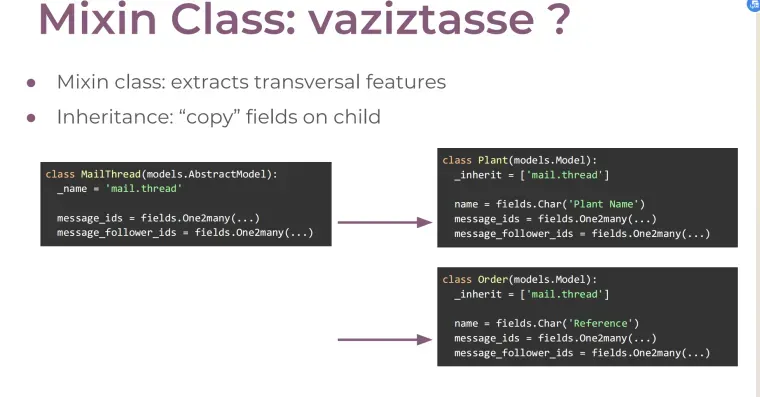
学习资料:https://github.com/tivisse/odoodays-2018/📎10 Mixins for App Empowerment.pdf📎Odoo Framework App Development.pdf
报表
目录结构
report 和对应的 action 通常保存在_reports 后缀的 xml 文件中
estate
├── models
│   ├── *.py
│   └── __init__.py
├── report
│   ├── estate_property_templates.xml
│   └── estate_property_reports.xml
├── security
│   └── ir.model.access.csv
├── views
│   └── *.xml
├── __init__.py
└── __manifest__.py
estate
├── models
│   ├── *.py
│   └── __init__.py
├── report
│   ├── __init__.py
│   ├── estate_report.py
│   └── estate_report_views.xml
├── security
│   └── ir.model.access.csv
├── views
│   ├── *.xml
│   └── estate_property_views.xml
├── __init__.py
└── __manifest__.py
report template示例
report template
<?xml version="1.0" encoding="UTF-8" ?>
<odoo>
  <template id="report_property_offers">
    <t t-foreach="docs" t-as="property">
      <t t-call="web.html_container">
        <t t-call="web.external_layout">
          <div class="page">
            <h2>
              <span t-field="property.name"/>
            </h2>
            <div>
              <strong>Expected Price: </strong>
              <span t-field="property.expected_price"/>
            </div>
            <table class="table">
              <thead>
                <tr>
                  <th>Price</th>
                </tr>
              </thead>
              <tbody>
                <t t-set="offers" t-value="property.mapped('offer_ids')"/>
                <tr t-foreach="offers" t-as="offer">
                  <td>
                    <span t-field="offer.price"/>
                  </td>
                </tr>
              </tbody>
            </table>
          </div>
        </t>
      </t>
    </t>
  </template>
</odoo>
report action
<record id="report_event_registration_badge" model="ir.actions.report">
        <field name="name">Registration Badge</field>
        <field name="model">event.registration</field>
        <field name="report_type">qweb-pdf</field>
        <field name="report_name">event.event_registration_report_template_badge</field>
        <field name="report_file">event.event_registration_report_template_badge</field>
        <field name="print_report_name">'Registration Event - %s' % (object.name or 'Attendee').replace('/','')</field>
        <field name="paperformat_id" ref="event.paperformat_euro_lowmargin"/>
        <field name="binding_model_id" ref="model_event_registration"/>
        <field name="binding_type">report</field>
    </record>
继承
使用 inherit_id = "module.parent_template_id"
Dashboard
<dashboard>
  <group>
    <aggregate name="min_expected_price" string="Min Expected Price" field="expected_price"
      group_operator="min" help="Lowest expected price."/>
  </group>
</dashboard>

<dashboard>
    <group>
      <widget name="pie_chart" title="Property Types" attrs="{'groupby': 'property_type_id'}"/>
    </group>
</dashboard>

<dashboard>
    <view type="graph"/>
    <view type="pivot"/>
</dashboard>
特殊报表
from odoo import fields, models, tools


class EstateReport(models.Model):
    _name = 'estate.report'
    _description = "Stock Report"
    _rec_name = 'id'
    _auto = False

    # _auto 可以让表不存在数据库中
    # _rec_name 指定表展示的名称

    def init(self):  # 覆盖初始化方法,创建一个SQL视图
        # 如果视图存在,则先删除,确保不冲突
        tools.drop_view_if_exists(self.env.cr, self._table)
        self.env.cr.execute("""CREATE or REPLACE VIEW %s as (
                               SELECT
                                  %s
                               FROM
                                  %s
              )""" % (self._table, self._select(), self._from()))
XML-RPC
xmlrpc.client
import xmlrpc.client

root = 'http://%s:%d/xmlrpc/' % (HOST, PORT)

uid = xmlrpc.client.ServerProxy(root + 'common').login(DB, USER, PASS)
print("Logged in as %s (uid: %d)" % (USER, uid))

# Create a new note
sock = xmlrpc.client.ServerProxy(root + 'object')
args = {
    'color' : 8,
    'memo' : 'This is a note',
    'create_uid': uid,
}
note_id = sock.execute(DB, uid, PASS, 'note.note', 'create', args)
urllib.request
import json
import random
import urllib.request

HOST = 'localhost'
PORT = 8069
DB = 'openacademy'
USER = 'admin'
PASS = 'admin'

def json_rpc(url, method, params):
    data = {
        "jsonrpc": "2.0",
        "method": method,
        "params": params,
        "id": random.randint(0, 1000000000),
    }
    req = urllib.request.Request(url=url, data=json.dumps(data).encode(), headers={
        "Content-Type":"application/json",
    })
    reply = json.loads(urllib.request.urlopen(req).read().decode('UTF-8'))
    if reply.get("error"):
        raise Exception(reply["error"])
    return reply["result"]

def call(url, service, method, *args):
    return json_rpc(url, "call", {"service": service, "method": method, "args": args})

# log in the given database
url = "http://%s:%s/jsonrpc" % (HOST, PORT)
uid = call(url, "common", "login", DB, USER, PASS)

# create a new note
args = {
    'color': 8,
    'memo': 'This is another note',
    'create_uid': uid,
}
note_id = call(url, "object", "execute", DB, uid, PASS, 'note.note', 'create', args)
多公司
1 个字段可以存不同公司的值
使用company_dependent和api.depends_context定义多公司字段
可以使用 depends_context 让 compute 依赖上下文
from odoo import api, fields, models

class Record(models.Model):
    _name = 'record.public'

    info = fields.Text()
    # 设置company_dependent,不同公司可以存不同的值
    # company_dependent 标识字段值依赖公司
    company_info = fields.Text(company_dependent=True)
    display_info = fields.Text(string='Infos', compute='_compute_display_info')

    @api.depends_context('company')  # 指示结果值依赖公司上下文,不同公司显示不同值
    def _compute_display_info(self):
        for record in self:
            record.display_info = record.info + record.company_info
可以通过 with_company 查看其他公司的字段值
# Accessed as the main company (self.env.company)
val = record.company_dependent_field

# Accessed as the desired company (company_B)
val = record.with_company(company_B).company_dependent_field
# record.with_company(company_B).env.company == company_B
有时候记录在多个公司间共享,但是不希望记录属于多个公司,比如不希望发票归属于不同的公司
可以通过以下方式解决
- 在关系字段上配置 check_company
- 在 create 和 write 的时候会自动检查公司
- company_id 字段不能设置 check_company
- check_company 会给 domain 加上 ['|', '('company_id', '=', False), ('company_id', '=', company_id)]
from odoo import fields, models

class Record(models.Model):
    _name = 'record.shareable'
    _check_company_auto = True

    company_id = fields.Many2one('res.company')
    other_record_id = fields.Many2one('other.record', check_company=True)
给 company_id 设置默认值
当 company_id 是必填的时候,一个比较好的方式是,给它设置默认值
company_id = fields.Many2one(
        'res.company', required=True, default=lambda self: self.env.company
)
翻译
- 在Settings ‣ Translations ‣ Import / Export ‣ Export Translations可以导出翻译
- 可以通过 POEdit 文件编辑
- Odoo 会自动导出可翻译字符串
- 非 QWeb 视图,所有文本节点被导出
- 以及 the content of the string, help, sum, confirm and placeholder attributes
- QWeb 模板,除了 t-translation=off 的块,所有文本节点被导出
- 以及 the content of the title, alt, label and placeholder attributes
- Field 字段,除非模型设置_translate=False,它们的 string 和 help属性会被导出
- selection 选项会被导出
- 如果字段设置了_translate,则字段的所有值会被导出
- _constraints 和_sql_constraints 的help/error 会被导出
- 显式导出
- 部分文本不会自动导出,需要显式标记
# In Python, the wrapping function is odoo._():

title = _("Bank Accounts")
// In JavaScript, the wrapping function is generally odoo.web._t():

title = _t("Bank Accounts");
- 标记的必须是字面量
- 比如 格式化字符串
- 被标记的必须是 格式化字符串_('%s hello') % name
- 先翻译再格式化(可以这样理解:如果先格式化的话,翻译就找不到对应的字符串了)
- 别拆分翻译
# Don’t split your translation in several blocks or multiples lines:

# bad, trailing spaces, blocks out of context
_("You have ") + len(invoices) + _(" invoices waiting")
_t("You have ") + invoices.length + _t(" invoices waiting");

# bad, multiple small translations
_("Reference of the document that generated ") + \
_("this sales order request.")
Do keep in one block, giving the full context to translators:

# good, allow to change position of the number in the translation
_("You have %s invoices wainting") % len(invoices)
_.str.sprintf(_t("You have %s invoices wainting"), invoices.length);

# good, full sentence is understandable
_("Reference of the document that generated " + \
  "this sales order request.")
- 处理单复数
#正确的做法
if invoice_count > 1:
  msg = _("You have %(count)s invoices", count=invoice_count)
else:
  msg = _("You have one invoice")
- _lt() 是翻译的懒加载方法,只有渲染的时候才获取翻译
# good, evaluated at run time
def _get_error_message(self):
  return {
    access_error: _('Access Error'),
    missing_error: _('Missing Record'),
  }
Do in the case where the translation lookup is done when the JS file is read, use _lt instead of _t to translate the term when it is used:

# good, js _lt is evaluated lazily
var core = require('web.core');
var _lt = core._lt;
var map_title = {
    access_error: _lt('Access Error'),
    missing_error: _lt('Missing Record'),
};